
Welcome Jetsetter!
Now that your free membership is set up, let’s quickly go over how our alerts work so you get started on the right foot.
Below, we’ll cover key details about your alert settings to make sure you receive the right alerts, along with a few other important tips.
Gmail & Yahoo Email Users
Since our alerts always include flight prices and promotional text about flight deals, email providers will often send them to your Promotions tab instead of your primary inbox.
These filters are usually turned on by default these days.
If you do not regularly check your Promotions tab, the quick, permanent fix is simple: just drag one of our emails into your primary inbox.
From then on, your email provider will usually deliver our alerts there, so you are less likely to miss a deal that would have otherwise landed in Promotions.
✨Premium Vs. Free Alerts
🚨 We want to be straight with you. Free plans get a few good deals each month—but not the best deals. There’s a reason for that.
This is also why we offer free trials of our premium plans, so you can actually get access to our best alerts.
Premium members want a few key things:
- 100% of our best alerts
- First choice from the available flight options
The exclusivity means fewer people know about the deal, which helps it last longer and gives members more time to secure their flights without having to race the masses to book.
Example:
Recently we sent an alert for roundtrip flights from Los Angeles (LAX) to Berlin (BER) for $196 round trip.
Since it was still available after four days, we decided to send it to free members as well, knowing our paying members already had plenty of time to secure their flights.
👉Twenty minutes after sending it out to everyone, the deal was gone! That is why we can't include premium alerts with our free plan.
It only takes a small number of people to share a deal with friends or family—a text here, a social media post there—and suddenly the entire internet knows about it. Poof—the deal is gone!
In other words, if we gave free members access to our best alerts, paying members would lose the very thing they are paying for: exclusive access to the best deals to ensure they can take advantage of them.
✨Why explain all of this?
Because we know that when members get to experience our best alerts with our premium plans, 92% remain paying members after 1 year! Whereas, only 7% of free plans ever upgrade! This is because they never get to see our best alerts.
This is why we wanted to give you another opportunity to try one of our premium plans, so you can get access to all of our best deals too.
Below, you can choose from:
- 30% off your first year, or 12 months for monthly plans
- The chance to access the free trial option you were shown at sign-up if you would rather try it first
If you don't love it, you can cancel anytime!
Our payment processor does not let us combine both offers, so we wanted to give you the choice.
If you would rather remain on the free plan, that is completely fine too—you can remain a free member forever and still get a few alerts each month, we just wanted to explain why free plans can't include our best alerts.
👉If that's what you want to do, just skip down to the membership tips and tutorial below so you can get the most out of your membership.
Recent Premium Alert Examples
Tap the toggle button to see more alert details
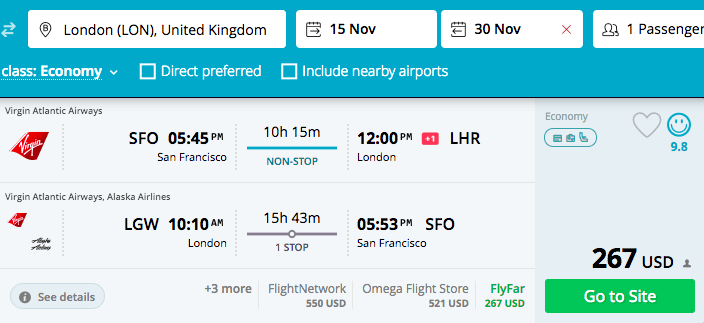
San Francisco (SFO) to London (LHR)
Economy Class Non-Stop
Airline: Virgin Atlantic
Price: $267 Round Trip
Last Checked Price: $919
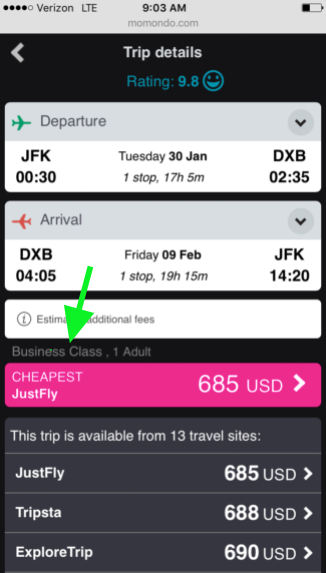
New York (JFK) to Dubai - Business Class
Business Class Lay Flat
Airline: Royal Jordanian
Price: $684 Round Trip
Normal Price: $3100-$4100
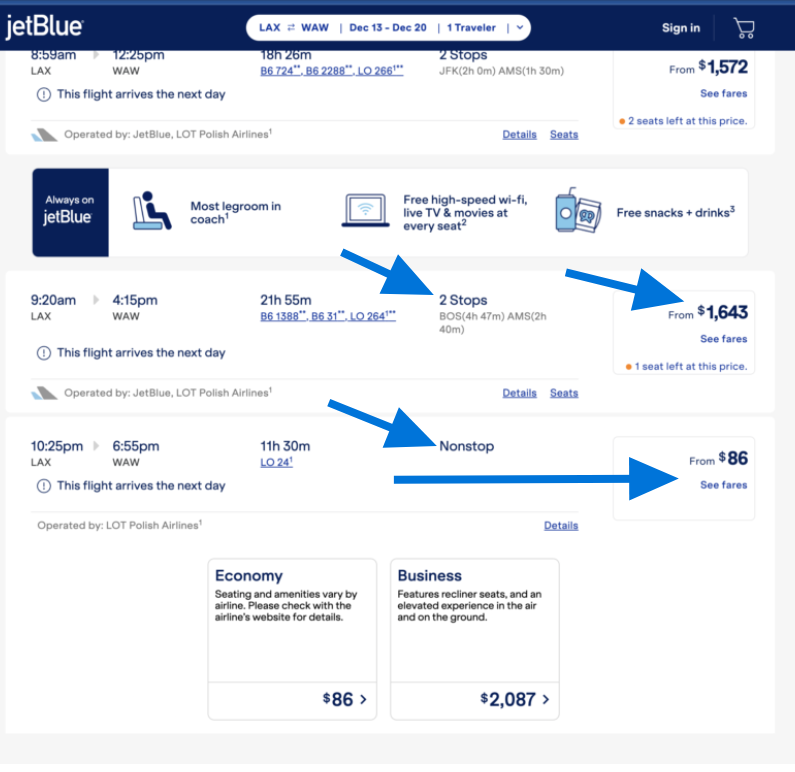
Los Angeles (LAX) to Warsaw (WAW)
- Mistake Fare
- Economy Class: 1-Way - Non-Stop
- Airline: JetBlue
- Price: $89
- Normal Price: (You can see it in the screenshot also)
- Note: The same economy flight that had 2 stops along the way was $1643, but there was a glitch (mistake fare) for $86 on the non-stop economy option.
Platinum Plan/Yeary
Annual plans already save you 34%—get an extra 30% off your first year.
View Offer
Switch Your Plan To A Premium Free Trial
Instead of the 30% off welcome offer, you can tap the button below to re-access the free trial offer.
Just select “Membership Plans” and it will give you another opportunity to take advantage of the free trial offer you saw at sign up.
Moving on, let's talk about your alert settings now so that you can ensure you're the alerts your getting are personalized for your needs.
Washington, D.C. Departures
Washington, D.C., has its own dedicated departure area. If you live in Northern Virginia or near Baltimore, it is a good idea to also select Washington, D.C., departures in addition to your home state, whether that is Maryland or Virginia.
This will give you alerts from both Dulles and Reagan, which are among the best airports in the nation for international flight options. Demand from government travelers and global organizations helps keep these routes highly competitive.
California Departures
Because of California’s size and number of airports, we split it into three options:
- Southern California Departures Only
Get alerts for flights departing from San Diego to San Luis Obispo, including all Los Angeles-area airports. - Northern California Departures Only
Get alerts for flights departing from Fresno to Redding, including major airports such as San Jose, San Francisco, Oakland, and Sacramento. - All California Departures
Get alerts for flights departing from airports across the entire state.
🚧 Select only one: Southern California, Northern California, or All California. Choosing more than one will cause you to receive the same alert more than once.
New York City Residents
Newark (EWR) is a major hub for many New Yorkers, but plenty of our New Jersey members prefer to only receive alerts from the New Jersey side. If you want the best of both worlds, select both New York and New Jersey departures in your settings—you’ll then receive alerts for all three NYC airports (JFK, LGA, and EWR).
While LaGuardia (LGA) is almost entirely domestic, both Newark (EWR) and JFK offer international routes and carriers that the other does not. Keeping both selected gives you access to opportunities from both hubs, as well as other airports in the state.
Departure Areas Tip
Let’s say we have a member named Dave.
Dave lives in South Bend, Indiana and has selected Indiana as his departure area.
That means he’ll receive alerts for flights out of South Bend, Indianapolis, Evansville, and Fort Wayne.
But here’s the thing—Chicago O’Hare (ORD), one of the largest international hubs in the U.S., is only about 1.5 hours from South Bend.
By also selecting Illinois Departures as well as Indiana, Dave will receive far more alerts, more routes, and more chances for incredible deals.
The same applies to smaller states like Vermont, New Hampshire, Delaware, Connecticut, or Rhode Island. While those states do have airports, they don’t have a true hub—an airport that connects directly to international destinations across the Atlantic or Pacific.
Hubs are airports that offer direct flights to international destinations and serve as the airports smaller airports connect through before heading overseas or to other destinations in the U.S.
The largest hubs include:
- Atlanta (ATL)
- Chicago O’Hare (ORD)
- Charlotte (CLT)
- Dallas–Fort Worth (DFW)
- Denver (DEN)
- New York JFK (JFK)
- Newark (EWR)
- Washington Dulles (IAD)
- Los Angeles (LAX)
- San Francisco (SFO)
- Boston (BOS)
- Miami (MIA)
- Houston Intercontinental (IAH)
These are just the largest—not a complete list.
For free plans, this isn’t a major concern since you’ll only receive a couple of alerts per month. But because this welcome page isn't shown again, we like to explain it now in case you choose to upgrade later.
You may update your alert settings anytime by:
- Logging into your account
- Go My Account
- Tap "Email Settings",
- It will then open up the options you were able to choose from at sign up, and you can toggle on or off departure areas of your choice.
If you would like to make any changes to those settings now, you can do so by tapping the button below.
Here’s a quick 5-minute tutorial to everything you need to know about our alerts. There’s no way to return to this welcome page later, so if you don't have time now, bookmark it for later.
Tap the button below to open the tutorial, then save it to your browser bookmarks—this way it’s always just a click away.
Our alerts are simple, but the tutorial shows you how to:
- Filter by your preferred airline on Google Flights when multiple carriers are included
- Use the info in each alert to quickly find all available travel dates on your own
- Understand stopover programs—where you can visit a second city for free on the same trip
We keep our email alerts short, and to the point! This tutorial gives you the full picture upfront, so you’ll know exactly what to do when our alerts arrive.

You're all set!
From here you can sit back and wait for your first alerts to arrive in your inbox!